Smart Tools
Best Apps for Managing Tasks and To-Do Lists: Find Your Most Efficient Workflow
Stay on top of your tasks with the best task management apps. This guide compares top apps, features, and tips so you can choose a tool that fits your productivity style.
Advertisement
Imagine the relief of glancing at your phone and seeing your entire day mapped out, nothing forgotten. It’s what task management apps deliver, seamlessly bridging plans and action.
Staying organized requires more than sticky notes or scattered reminders. People rely on digital tools to simplify the flood of deadlines, errands, and important obligations—helping you feel less overwhelmed.
Dive into this guide for practical evaluations, hands-on tips, and clear steps. By the end, you’ll know which task management apps suit your everyday routine—and how to get the most from each.
Choosing an App That Matches the Way You Work
Selecting a tool you’ll stick with, not just try, is the first victory. The right app simplifies your days and fits naturally into how you already approach work and life.
Using task management apps is like investing in the best pen, not the fanciest—pick what makes it easy to get things out of your head and into action.
List-Based Apps for First-Time Organizers
When you’re new to digital organization, apps such as Todoist or Microsoft To Do feel familiar. Tap out your daily tasks and drag to reorder—just like jotting on paper.
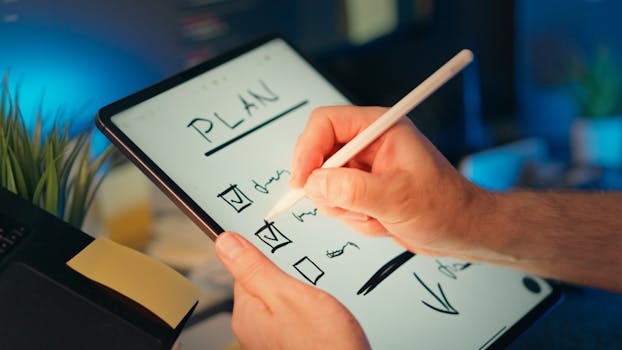
Start by listing all commitments—then use checkboxes for satisfaction. If you finish something, tap to complete and watch the app organize your week with clean, visible progress.
Simplicity is key for newcomers. Skip over custom automation at first. Instead, keep your task management apps focused on today’s list and what you’ll tackle next.
Calendar-Style Apps for Visual Thinkers
Some people work best seeing time blocks. Drag-and-drop planners like Any.do or Google Tasks sync your lists to a calendar, visually spreading tasks across days.
Add a meeting by tapping the time slot, set color-coded reminders, and watch the day fill with clear, actionable appointments. This app style turns intentions into timed commitment.
Those who like to “see the week at a glance” quickly get the value. Try slotting one to-do at each time for a balanced workload, making sure nothing slips through.
| App Name | Best For | Key Feature | Takeaway |
|---|---|---|---|
| Todoist | Simple lists | Prioritization | Start with this if you favor lists and want easy drag-to-complete functionality. |
| Microsoft To Do | Reminders | Smart suggestions | Use this when you want digital reminders that surface at the right moment. |
| Any.do | Visual scheduling | Calendar sync | Opt for a calendar layout if you work best setting time blocks visually. |
| TickTick | Habit tracking | Pomodoro timer | Choose for extra focus features integrated alongside to-dos. |
| Google Tasks | Gmail integration | Email-to-task | Pull emails into tasks seamlessly if most requests land in your inbox. |
Boosting Everyday Focus With Features That Really Help
Choosing task management apps with the right features lets you protect attention and get more done. The outcome: you reach the end of the day feeling genuinely accomplished.
Apps with smart scheduling, recurring reminders, or focus modes stop urgent interruptions from derailing your priorities. The right feature can shape your habits every day.
Smart Reminders and Recurring Tasks
Adding repeating reminders for bills or weekly meal planning frees your brain for priorities. Try, “Remind me every Thursday at 6 PM,” for a consistent schedule.
This habit trains your mind to check apps before the day gets busy. You’ll start anticipating weekly chores or regular work tasks, and never scramble last minute.
- Enable repeating reminders for recurring chores—this saves mental space so you can relax outside work.
- Use color coding for categories: helps scan tasks quickly and group similar items together on your list.
- Add location-based alerts for errands—get reminders as soon as you enter a grocery store or pharmacy.
- Label deadlines clearly to know what’s urgent, what’s for next week, and what’s a wish list.
- Schedule fun things, not just work—having downtime on your list changes how you approach each day.
Check off completed items, then review “all done” by week’s end. This method in task management apps reinforces a sense of achievement and keeps your energy up.
Integrations That Pull Everything Together
Find task management apps that connect with your calendar, notes, and communication platforms to centralize commitments. This prevents forgotten follow-ups and repeated context switching.
- Sync your calendar for a unified schedule—you won’t double book or forget overlapping events.
- Link with note-taking tools to attach research or meeting notes directly inside tasks, so important references travel with you.
- Connect messaging platforms for actionable reminders from conversations—turn “I’ll handle it” into an actual task.
- Import tasks from project boards if you collaborate with others—keep work and personal lists in one spot, even if they look different.
- Enable voice input for adding tasks quickly while driving or making breakfast, reducing friction and boosting consistency.
Finish each week by reviewing connections. You’ll notice fewer dropped deadlines and a stronger sense of being in control.
Building Habits and Motivation With Consistency Tools
Apps built for repeat routines make new habits stick. Choose task management apps designed with streak-tracking, motivational badges, or day-by-day views to visually measure progress.
Seeing a streak build over several days creates rewarding momentum. Missing a day appears as a gap—prompting you to get back on track.
Tracking Daily Tasks to Form Routine
Set up a recurring “morning focus” list: meditation, a healthy breakfast, reviewing the day. Mark off each item and watch progress appear.
Try a script: “I’m building a streak—tap each box every day before coffee.” Visual cues reinforce habit and create visible accomplishment quickly.
Automate recurring items so they repopulate automatically. There’s no need to rewrite; your routines are waiting each morning to keep you anchored.
Encouragement With Badges and Rewards
Motivational badges, like “7-Day Streak” or “Inbox Zero,” spur you to keep going. Visual rewards break larger goals into small, achievable checkpoints.
Celebrate milestones by marking each with a symbol or sticker on your app’s dashboard. These small wins add up to bigger consistency—and more lasting changes.
If you miss a badge, set a single goal: “Complete every task this week.” Copy that challenge into your app and track your follow-through.
Turning Group Plans Into Action With Collaboration Apps
When you need to align teams or families, group-focused task management apps ensure everyone is on the same plan. Shared lists reduce confusion and boost accountability.
You’ll see updates in real time, assign tasks, and leave comments. This structure works for grocery shopping, planning events, or tracking multi-step work projects.
Assigning and Tracking Duties in Shared Lists
Create a shared list named “Weekend Projects” or “Office Deadlines.” Assign people by email or username so no task gets lost.
Comment directly on tasks for additional details: “Pick up snacks,” or “Attach document before review.” Group discussions stay organized and accessible.
Set notifications so everyone hears about changes instantly—and you avoid back-and-forth apologies for missed steps.
Managing Edits and Updates Across Devices
Sync your list across all devices so family or team members know what’s happening whether on phone or laptop.
If someone buys an item, mark it complete from the grocery aisle. Everyone sees the update and avoids buying twice.
Encourage group check-ins—”Let’s update our shared list every Friday”—to keep the process smooth. Accountability rises as visibility improves.
Creating the Perfect System for Your Personal Style
Not every method works for every person. Adjust task management apps to fit your own workflow by experimenting with structure and notification types.
Some thrive with rigid categories; others do better with minimal organization and quick entry. Tweak app settings to align with your personality and goals.
Streamlining With Folders and Labels
Break big projects into subfolders or use labels for “work,” “home,” or “health.” Find what grouping system feels right and stick to it for faster task scanning.
Consistency breeds speed. If tasks land in the right place, you won’t waste time hunting for them or wondering what’s next.
Test by moving a month’s worth of to-dos into a new folder structure. If you finish tasks faster, you’ve found a match; if not, adjust for simplicity.
Customizing Notifications and Reminders
Change notification frequency, timing, and sounds. A lunchtime ping may keep you moving, while others prefer a silent morning summary.
Start with one change at a time: “Mute weekends,” or “set reminders for recurring deadlines.” Look for patterns in what helps you check off more items.
If a change boosts your completion rate, keep it. If you ignore pings, tweak again. The ideal setup feels energizing, not overwhelming.
Conclusion: Moving Forward With Confidence and Clarity
Task management apps transform scattered intentions into daily wins. Choosing the right platform, adjusting features, and building habits make you the architect of your productive life.
Organization frees you for creative work, restful downtime, or time with family and friends. Apps work best when you tune them to your unique rhythm and needs.
Embrace experimentation. The habits you anchor in the right app today support every tomorrow, powering real progress—one checked-off task at a time.